Application Settings
Application configuration lives on the application detail page under Settings. Runtime sizing and automatic scaling have a dedicated Capacity tab, with a shortcut from the application summary.
Source Summary
The source section shows:
- Repository.
- Branch.
- Build method.
- Port.
Use this section to confirm the app is deploying from the expected source before triggering a new deployment.
Domains
The domains section shows:
- Generated Moltern URL.
- Custom domain input.
- Verification status.
- Records to copy to your domain provider.
- Check now action for pending domains.
- Remove action.
Add custom domains only after the generated Moltern URL works.
Runtime
Runtime settings include:
- Port.
- Health check path.
The port must match the port your app listens on. The health check path should return quickly and successfully when the app is healthy.
File Storage
Web service apps can enable shared filespace.
Settings include:
- Enabled or disabled.
- Mount path, such as
/data. - Access mode: read/write or read-only.
Use shared filespace for files the app must retain across deploys. Do not use the application container filesystem for important persistent data unless shared filespace is enabled.
Environment Variables
The variables section supports:
- Individual edit mode.
- Bulk edit mode.
- Build-time flag per variable.
- Write-only handling for sensitive names.
- Deleting variables.
See Environment Variables And Secrets.
Build Overrides
Build override fields include:
- Install command.
- Build command.
- Start command.
Use overrides when auto-detection needs help.
Examples:
pnpm install --no-frozen-lockfile
pnpm run build
node build/index.js
Keep commands short and reproducible.
Capacity Controls
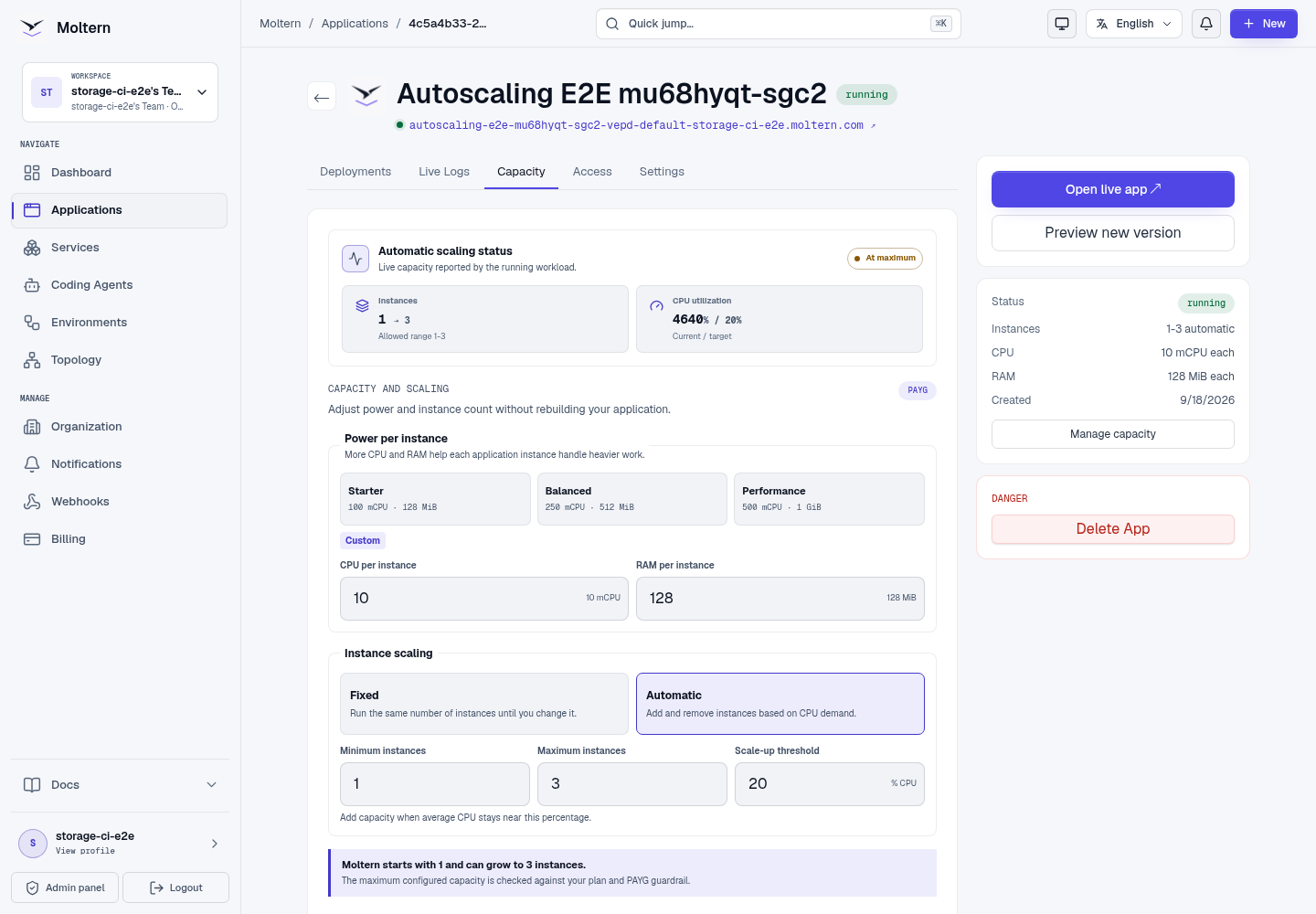
Open the Capacity tab for a supported web service app. It includes:
- Starter, Balanced, and Performance size presets.
- Custom CPU and RAM for each instance.
- Fixed instance count.
- Automatic scaling with minimum and maximum limits.
- A CPU scale-up threshold.
- Review change and Apply changes actions.
- Billing impact and plan warnings.
Choose capacity during application creation when you already know the expected workload. You can change it later from the Capacity tab without rebuilding the source code. The review uses the automatic-scaling maximum when checking plan and PAYG impact. Always review before applying.
Changing CPU or RAM replaces runtime instances gradually. Watch application health and live logs until the update is complete.
When automatic scaling is enabled, Capacity shows both the saved policy and the observed runtime state. Current → desired tells you whether Moltern is adding or removing instances; Configuring, Active, At maximum, and Metric unavailable explain whether the policy can currently make decisions. A saved policy alone is not shown as active until Moltern observes it running.
Automatic scaling is limited to supported web service applications. Static sites do not use runtime instances, and Moltern rejects the option when the application type or platform measurement path cannot support it safely.
Delete App
Deleting an app removes the app workload from Moltern.
Before deleting:
- Confirm it is the correct environment.
- Confirm no active domain should remain attached.
- Confirm logs or release history are no longer needed.
- Confirm the owner approved removal.
Moltern removes the application's automatic-scaling policy during deletion, including when the application is deleted while scaling is enabled.
Deletion cannot be used as a rollback strategy. Use a new deployment or static-site promotion when you need to restore a version.