Webhooks
Webhooks connect Moltern with the tools your team already uses. The page supports two directions:
- Inbound deploy hooks let an external system trigger a Moltern application deployment.
- Outbound deployment events let Moltern notify your HTTPS endpoint after a deployment succeeds or fails.
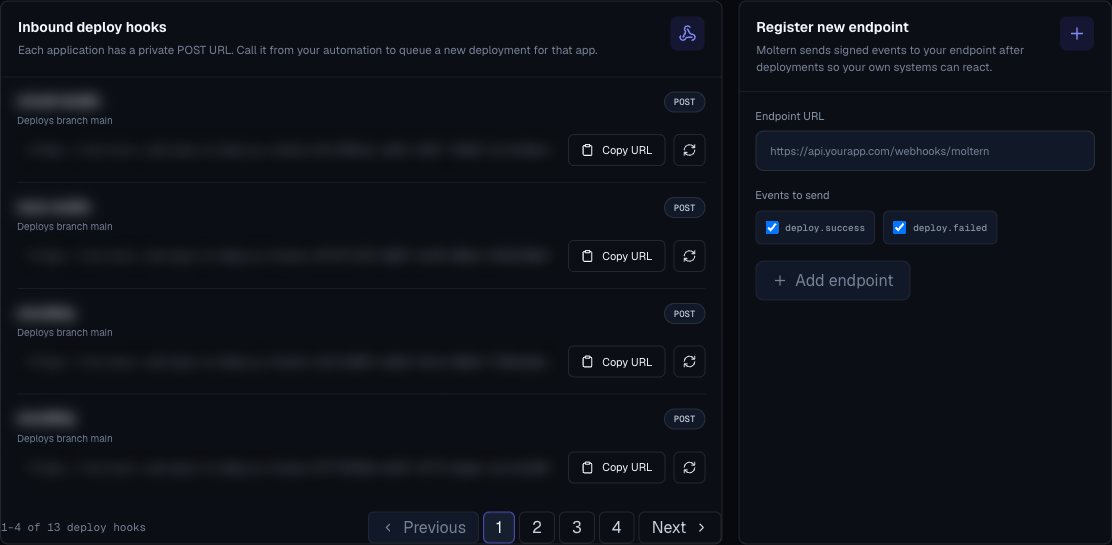
The screenshot uses demo URLs and masked values. Do not publish a real deploy hook URL or webhook signing secret.
When To Use Webhooks
Use inbound deploy hooks when a tool outside Moltern should start a deployment, for example a repository host, release orchestrator, scheduler, or internal automation script.
Use outbound deployment events when another system should react after Moltern finishes a deployment, for example chat notifications, audit logging, incident creation, release tracking, or smoke-test automation.
Supported Event Types
Outbound endpoints currently expose deployment result events:
| Event | Meaning |
|---|---|
deploy.success | An application deployment succeeded. |
deploy.failed | An application deployment failed. |
Failed deployment events use the same general payload shape as success events and include an error message when one is available.
Inbound Deploy Hooks
Each Moltern application can have a private deploy hook URL. Calling that URL with POST queues a new deployment for that application.
Get A Deploy Hook
- Open Webhooks.
- Find the application under Inbound deploy hooks.
- Confirm the branch shown under the app name is the branch you expect Moltern to deploy.
- Click Copy URL.
- Store the URL as a secret in the external system that will trigger the deployment.
If no deploy hook appears, create an application first. Deploy hook rows are created for applications.
Trigger A Deployment
Configure your external system to send a POST request to the copied URL.
curl -X POST "$MOLTERN_DEPLOY_HOOK_URL"
To deploy a specific commit, pass commit_sha as a query parameter or JSON field:
curl -X POST "$MOLTERN_DEPLOY_HOOK_URL?commit_sha=abc123"
curl -X POST "$MOLTERN_DEPLOY_HOOK_URL" \
  -H "Content-Type: application/json" \
  -d '{"commit_sha":"abc123"}'
A successful trigger queues a deployment and returns a response shaped like this:
{
  "deployment_id": "dep_123456789",
  "status": "queued"
}
Regenerate A Deploy Hook
Click Regenerate when a deploy hook URL may have been exposed or ownership of the external automation changes. Regeneration invalidates the previous URL, so update every system that still uses the old one.
Outbound Deployment Events
Outbound endpoints receive signed deployment events from Moltern.
Add A Webhook Endpoint
- Open Webhooks.
- Enter the receiving service URL. Moltern requires an
https://URL. - Select
deploy.success,deploy.failed, or both. - Click Add endpoint.
- Confirm the endpoint appears in the endpoint list.
- Click Show secret only when you are ready to configure the receiver.
- Store the signing secret in the receiving system's secret manager.
Do not paste signing secrets into tickets, chat, screenshots, or shared docs.
Example Payload Shape
Moltern sends a payload with the event type and deployment details.
{
  "eventType": "deploy.success",
  "payload": {
    "deployment_id": "dep_123456789",
    "app_name": "my-api",
    "status": "success",
    "url": "https://my-api.example.com",
    "timestamp": 1717785600
  }
}
Use this structure to map Moltern events into your receiving system.
Receiver Checklist
Before you rely on the integration, test both the transport and your receiver behavior:
- Confirm the receiving URL is public and uses HTTPS.
- Confirm the receiver accepts
POSTrequests. - Confirm the selected event types match the deploy result you want to handle.
- Validate the signing secret in your receiver before trusting the payload.
- Log the
eventType, deployment id, application name, and status. - Return a successful HTTP response quickly, then do slower work asynchronously in your receiver.
Security Checklist
Treat both deploy hook URLs and outbound signing secrets like credentials:
- Keep deploy hook URLs private. Anyone with the URL can request a deployment for that app.
- Reveal outbound signing secrets only when configuring the receiver.
- Store every deploy hook URL and signing secret in the receiving system's secret manager.
- Remove and recreate an outbound endpoint if its signing secret is lost or exposed.
- Regenerate an inbound deploy hook if its URL is lost or exposed.
- Use a different receiver endpoint for production automation than for test automation.
- Limit who can access the Webhooks page in your workspace.
Delivery Troubleshooting
If an inbound deploy hook does not queue a deployment:
- Confirm the external system sends
POST, notGET. - Confirm it uses the current copied URL, especially after regeneration.
- Confirm the application still exists in Moltern.
- Confirm workspace quota and billing guardrails are not blocking the deployment.
- Check the application deployments page for a newly queued or failed deployment.
If outbound events do not appear in the receiver:
- Confirm the endpoint starts with
https://. - Confirm the receiving service is reachable from the public internet.
- Confirm the selected event type matches the event you expect.
- Confirm the receiver accepts the payload shape.
- Confirm the receiver validates the signing secret configured in Moltern.
- Remove and recreate the endpoint if the signing secret was lost.
Good Uses
- Notify a chat channel when production deploys succeed or fail.
- Create an incident when a production deployment fails.
- Trigger a downstream smoke test after deploy success.
- Record deployment events in an audit system.
- Notify an owner when a critical app fails to deploy.