Organization Security
Organization security combines authorization with policy guardrails. A valid role grant never bypasses a stricter organization policy.
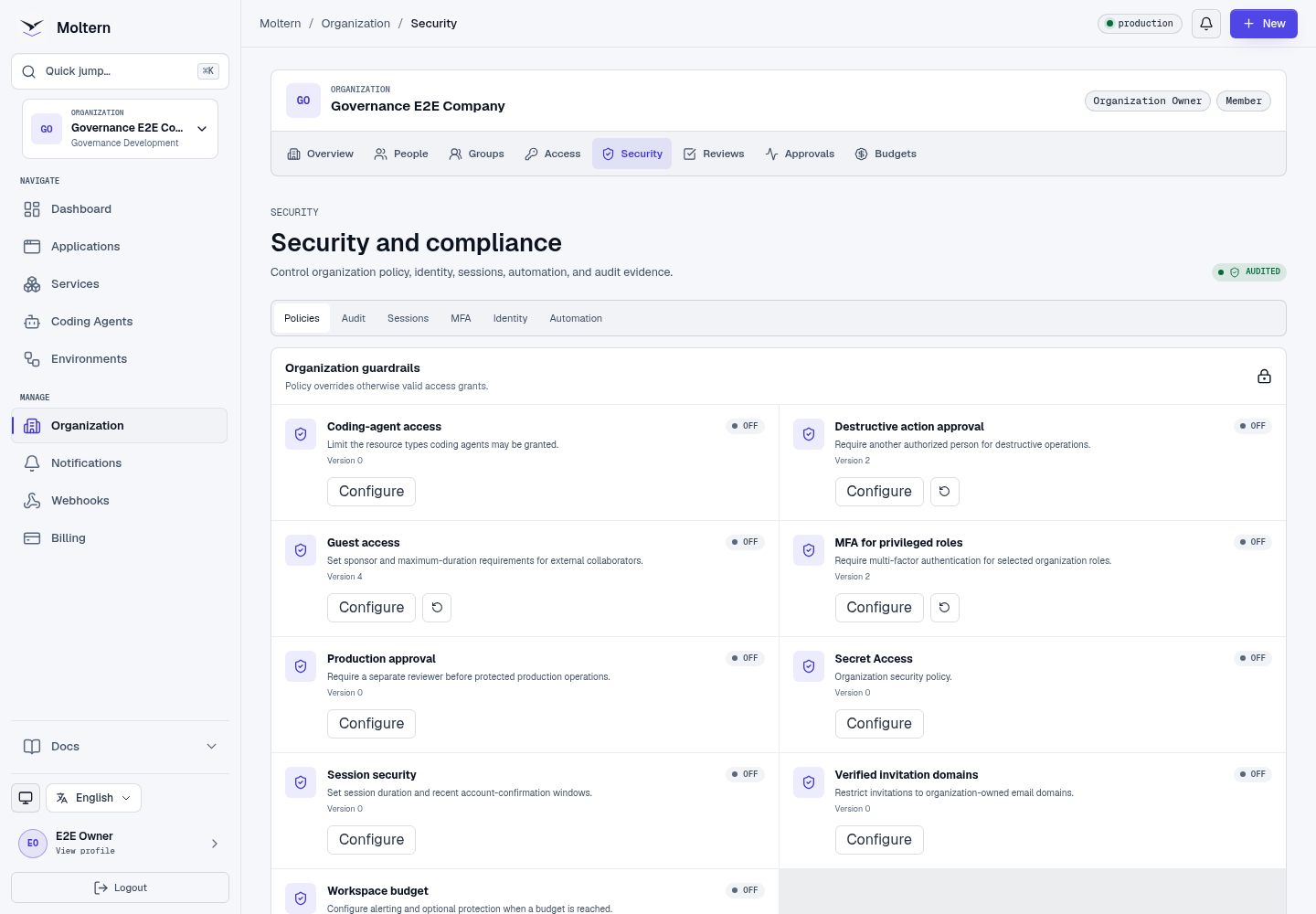
Who Should Use This Page
Organization owners and security administrators should manage these settings from Organization -> Security.
Configure A Guardrail
Available policies can govern guest access, verified invitation domains, privileged MFA, secret access, coding-agent access, sessions, production approvals, destructive actions, and workspace budgets.
- Open the Policies tab.
- Select Configure beside a policy.
- Set its typed options.
- Select Preview impact.
- Review the affected people and resources.
- Confirm your account and save.
Every update creates a version. Use policy history to restore an earlier known-good version without deleting the record of later changes.
Set Up Multi-Factor Authentication
- Open the MFA tab.
- Select Set up MFA.
- Add the setup key to a standards-compatible authenticator.
- Enter the current code.
- Store the one-time recovery codes securely.
When privileged MFA policy applies to your role, protected actions remain blocked until enrollment and a current challenge succeed.
Review And Revoke Sessions
The Sessions tab shows organization sessions, authentication method, trusted public network address when available, recent activity, and revocation state. Revoke a lost, shared, or obsolete session from a separate trusted session.
Revocation also prevents the session from issuing new terminal, realtime, or confirmation credentials.
Review Audit History
The Audit tab records governance and security events with actor, resource, decision reason, request identifier, and time. Authorized security staff can export a filtered, secret-safe CSV.
Audit records are integrity-linked and immutable. They never intentionally include passwords, tokens, connection strings, payment details, or secret values.
Deleting a workload does not erase its organization audit history. Authorized reviewers can continue to filter historical events by resource after the workload itself is gone.
Automation Identities
Use one automation identity per trusted integration.
- Open the Automation tab.
- Create an identity with a clear purpose.
- Create a credential and store it when shown; it cannot be revealed again.
- Grant the identity a narrow role and scope from Access.
- Revoke the grant or credential when no longer needed.
Automation identities cannot use human account endpoints and do not receive access merely by being created.
Expected Result
Sensitive changes require the correct permission, recent confirmation, and MFA or approval when policy requires them. Audit history remains available to authorized reviewers.
Troubleshooting
| Symptom | What to check |
|---|---|
| Protected action requests MFA | Complete enrollment or enter a current authenticator/recovery code. |
| Policy cannot be saved | Run impact preview first and correct invalid values. |
| Session address is unavailable | Older or provider-created sessions may predate trusted public-address capture. |
| Automation credential is lost | Revoke it and create a replacement; stored values cannot be revealed. |
Next: Configure enterprise identity or run an access review.