Roles And Scoped Access
Moltern evaluates access from a principal, role, and scope. A principal can be a person, group, or automation identity. A scope can be an organization, workspace, environment group, environment, application, service, database, or coding agent.
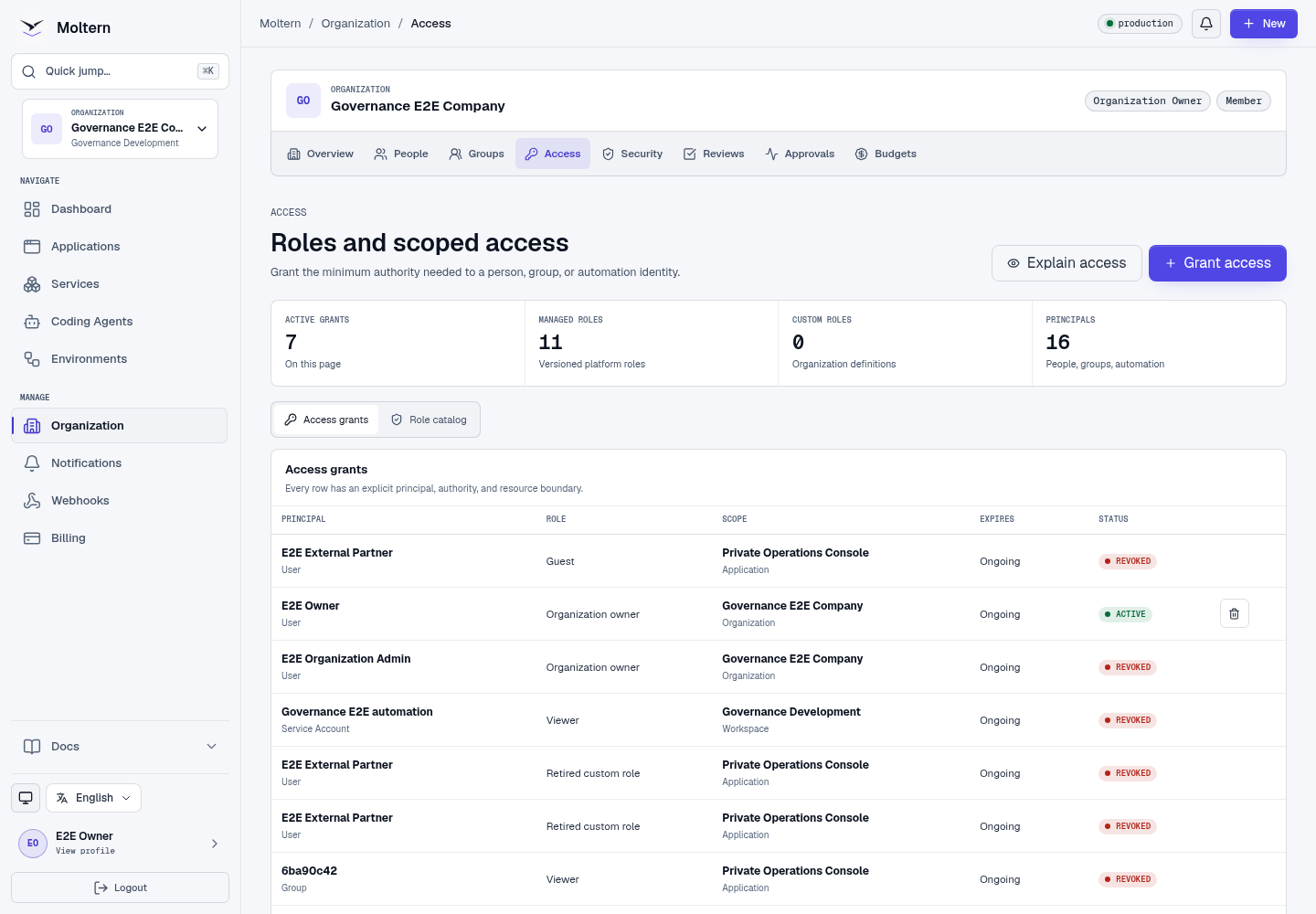
Managed Roles
Use a managed role whenever it fits. Common roles include:
| Role | Intended use |
|---|---|
| Organization Owner | Full accountable ownership, including protected transfer and removal. |
| Organization Admin | People, groups, workspaces, and normal organization operations. |
| Security Admin | Policy, identity, sessions, audit, and access reviews. |
| Billing Admin | Subscription, usage, budgets, and cost attribution without workload secrets. |
| Developer | Build and deploy within an approved scope. |
| Operator | Run, restart, and scale approved workloads without broad administration. |
| Viewer | Read-only visibility. |
| Guest | Constrained, normally expiring external access. |
Permissions for deploying, operating, using a configured secret, changing a secret, and revealing a secret are separate.
Grant Access
You need permission to manage grants at the target scope. High-risk grants also require recent account confirmation and may require MFA.
- Open Organization -> Access.
- Select Grant access.
- Choose a person, group, or automation identity.
- Choose a managed or active custom role.
- Choose the narrowest useful scope.
- Set an expiry for temporary access.
- Review sensitive permissions and inheritance.
- Confirm the action.
Moltern rejects principals, roles, and resources that belong to different organizations.
Explain Effective Access
Select Explain access to inspect the final decision for a person and scope. The explanation identifies direct, group, inherited, expired, suspended, guest-restricted, and policy-limited sources.
Frontend controls are only a convenience. The API independently resolves the resource and authorizes every protected request.
Custom Roles
Eligible organizations can create a custom role from Moltern's fixed permission catalog.
- Open the Role catalog tab.
- Create a role with a clear job-based name.
- Choose one scope type.
- Select only required permissions.
- Review and confirm.
Changing a custom role creates a new role version. Retired definitions remain attributable in historical grants and audit records.
Revoke Access
Revocation takes effect immediately. Open terminals, realtime sessions, and cached authorization decisions are invalidated when their authority is removed.
Expected Result
The principal can discover and perform only the actions granted at the selected scope. Foreign or unknown resource identifiers produce the same public not-found behavior.
Troubleshooting
| Symptom | What to check |
|---|---|
| Permission remains denied | Inspect effective access, scope ancestry, expiry, group status, and organization policy. |
| Grant form excludes a role | The role may not support that scope or may exceed delegated authority. |
| Secret value remains hidden | Secret use does not include secret reveal. Grant reveal only when necessary. |
| Recently revoked browser still shows a control | Refresh the page; the API already rejects the stale action. |