Auth And Account Access
Moltern account access covers signing in to the product and connecting source providers for deployments.
Sign In Options
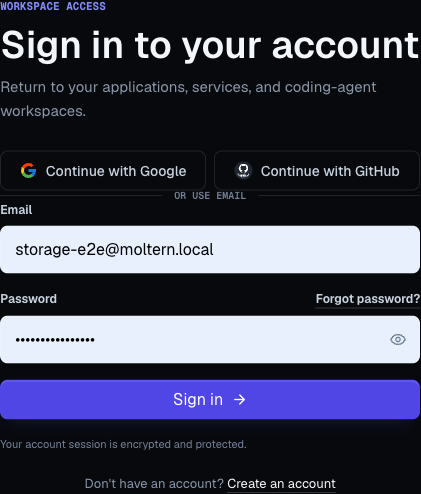
The sign-in page can show:
- Email and password.
- Continue with Google.
- Continue with GitHub.
- Continue with organization SSO for a verified company domain.
The options shown depend on the workspace and product configuration.
Create An Account
The registration page asks for:
- Name.
- Email.
- Password.
- Password confirmation.
Passwords must be at least 8 characters.
For an email-and-password registration, Moltern sends a verification link before the first sign-in. Open the link to confirm that the address can receive account and recovery messages. The workspace becomes accessible after verification succeeds.
See Notifications And Email for required security receipts and delivery troubleshooting.
OAuth Sign-In
OAuth sign-in lets users authenticate with an external provider.
If OAuth fails:
- Confirm popups and redirects are allowed.
- Try the same provider again.
- Check whether the provider account uses the expected email address.
- Clear Moltern cookies if the browser keeps returning to login.
GitHub Login Versus GitHub Repository Access
GitHub login and GitHub repository access are separate.
| Area | Purpose |
|---|---|
| GitHub login | Authenticates your Moltern user account. |
| Moltern GitHub App installation | Grants Moltern access to selected repositories for deployments. |
Installing the Moltern GitHub App does not change your Moltern login identity.
Connection Details Password
Moltern uses a separate password to reveal sensitive connection details for managed services, such as database passwords, tokens, and generated connection strings.
This password is different from your login password:
- Email/password users keep their normal login password for signing in.
- Google or GitHub users can set a connection details password without creating an email/password login.
- The connection details password is only used when revealing sensitive service connection values.
The first time you reveal sensitive connection details, Moltern asks you to set this password. After that, enter the same password whenever you need to reveal masked values again.
Use a password manager and do not share this password in tickets, chat, or docs.
See Connection Details Password for the step-by-step setup flow.
Connect GitHub For Deployments
From Applications -> New App:
- Click the GitHub connection prompt.
- Allow the popup.
- Choose the GitHub account or organization.
- Select only the repositories Moltern should deploy.
- Return to Moltern.
- Refresh the repository list if needed.
Repository Access Troubleshooting
If a repository is missing:
- Confirm it was selected in the GitHub App installation.
- Confirm organization approval is complete.
- Confirm you are in the correct Moltern workspace.
- Click refresh in the repository picker.
- Reopen the GitHub installation and adjust repository access.
Access Hygiene
- Remove repository access when a workspace no longer deploys that repo.
- Avoid granting all repositories if selected access is enough.
- Use separate production and development environments.
- Keep user accounts tied to real people, not shared logins.
- Rotate credentials and webhook secrets when owners leave.
Organization Invitations And Enterprise Sign-In
An organization invitation is separate from normal registration. Its single-use link is bound to the invited email and can be accepted with a matching email/password, Google, or GitHub identity. See People And Invitations.
Eligible organizations can verify a company domain and configure SAML 2.0 or OpenID Connect sign-in. When the organization requires SSO, password and social sign-in for its verified domains are redirected to the configured provider. Directory provisioning through SCIM creates or suspends people and groups but does not grant workload access automatically. See Enterprise Identity.