Deploy A Catalog Service
Use the service catalog when you want to deploy packaged software instead of building from your own repository.
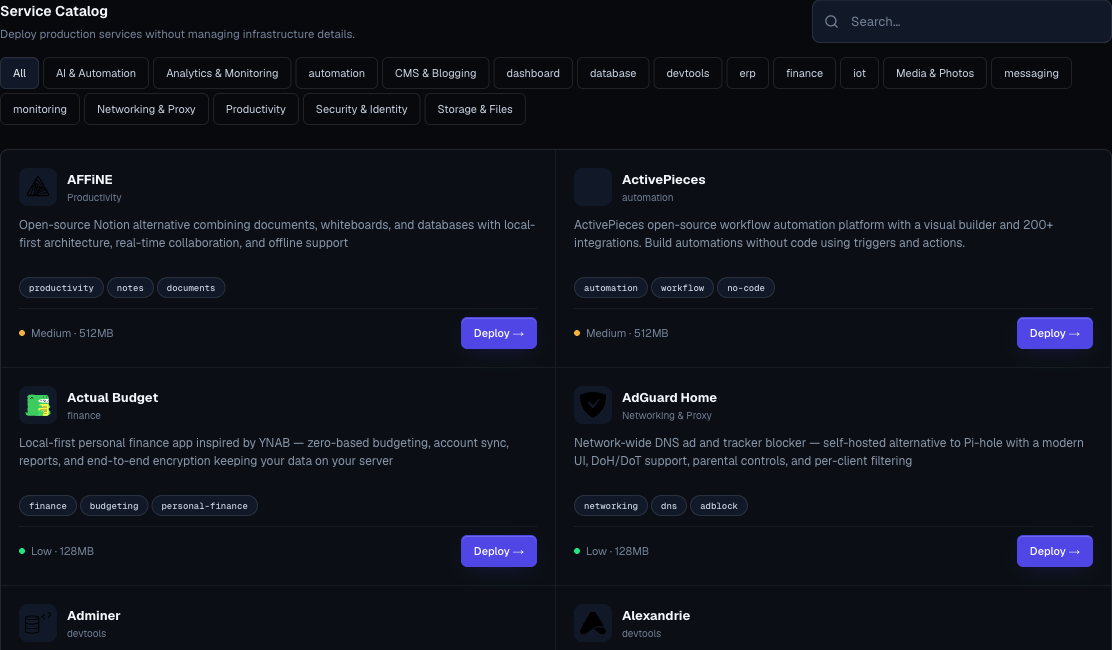
1. Find The Service

Open Services and use:
- Search by service name or tag.
- Category filters.
- Complexity and memory estimate on each card.
- In-app service docs for service-specific notes.
2. Review The Card
Before deploying, check:
- Service name.
- Description.
- Category.
- Tags.
- Complexity.
- Minimum memory estimate.
- Archived warning, if shown.
If a service is archived, choose a current alternative unless you have a specific compatibility reason.
3. Choose A Variant
If the service has variants, Moltern shows a variant picker.
Pick the variant that matches your plan:
- Use recommended defaults for first deploys.
- Choose a database-specific variant only when you know which database engine you need.
- Choose a lightweight variant for experiments.
- Choose production-ready variants when the service will store important data.
4. Name The Service
Use a clear, durable name.
Good examples:
prod-postgresanalytics-metabasesupport-chatai-open-webui
Avoid names like test2, new-service, or names tied to a person's laptop or temporary task.
5. Pick Environment Group And Environment
Choose the correct environment. If no environment exists, create one first from Environments.
For production services, confirm:
- The environment is production.
- The owner approved the deployment.
- Billing and quota can support the service.
6. Fill Configuration
Service templates may ask for:
- Text values.
- Password values.
- Numeric values.
- Select options.
Sensitive fields are marked in the UI. Keep values out of chat and tickets.
7. Deploy And Watch Status
Click Deploy.
The service detail page shows:
- Status.
- Public URL when available.
- Service details.
- Dependencies.
- Live logs.
- Terminal for supported development services.
- Domains.
- Controls.
- Size controls where supported.
- Delete preview flow.
8. Open The Service
If the service has a URL:
- Wait for running status.
- Open the generated Moltern URL.
- Complete any first-run setup inside the service.
- Add a custom domain only when needed.
For framework starter services, open the Terminal tab after the service is running if you need to inspect generated files, run framework commands, or test private service connections.
Production Service Checklist
- Owner is known.
- Environment is correct.
- Required variables are saved.
- Generated URL works if public.
- Access control inside the service is configured.
- Storage expectations are documented.
- Billing impact is acceptable.
- Deletion and recovery expectations are clear.